As a Docker Desktop Extension
This guide shows you how to install Microcks as a Docker Desktop Extension on your local machine. This way of installing Microcks is very convenient for people who want to start quickly with the most common Microcks capabilities and without hitting the terminal 👻
Docker Desktop is a simple-to-install application for Mac, Windows, or Linux that allows you to create and share containerized applications and microservices. Docker Desktop includes the Docker Engine, the Docker CLI client, Docker Compose, Docker Content Trust, Kubernetes, and the Credential Helper.
Installation
To get started, make sure you have Docker Desktop installed on your system. Then, once it is running
-
Select Add Extensions and type
microcksin the search box, -
Choose Microcks, install and launch it, and you are ready to go 🤩
The video just below illustrates the installation process as well as the creation of a first Direct API. It has never been simpler to set up and use Microcks on a laptop. 🙌
Settings
The settings panel allows you to configure some options, such as whether you'd like to enable the Asynchronous APIs features (disabled by default) and whether you need to set an offset to ports used to access the services.
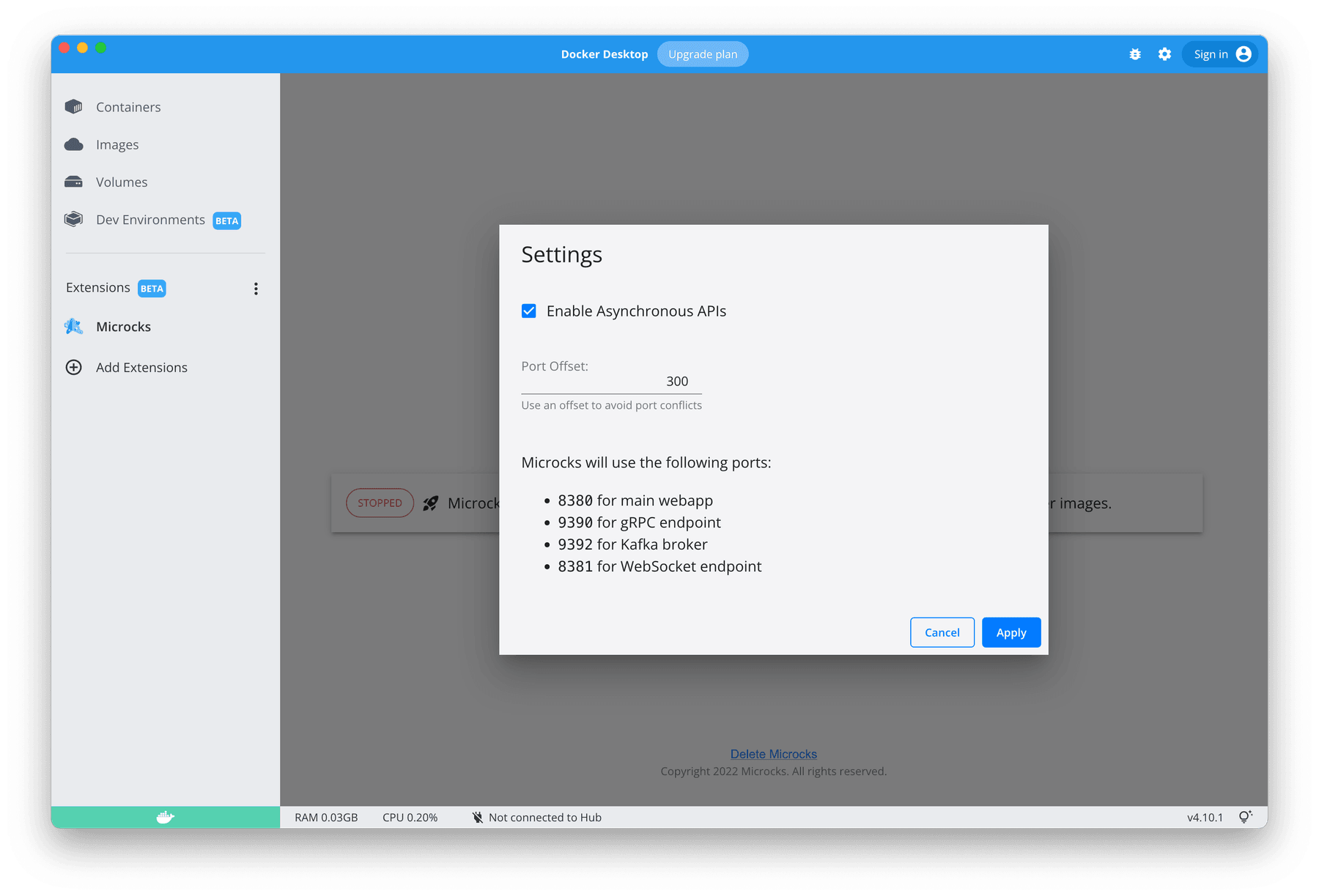
Pretty straightforward!
Wrap-up
You just installed Microcks in a graphical way on your local machine. Congrats! 🎉